
What quietly goes wrong in your Microsoft 365 tenant
September 1, 2026
You spent an afternoon cleaning up. Multi-factor authentication on for everyone, legacy protocols off, admin rights back down to four people. All correct. You put a reminder in the calendar to look again in a year.
A year later you look. And plenty has changed without anyone doing anything wrong.
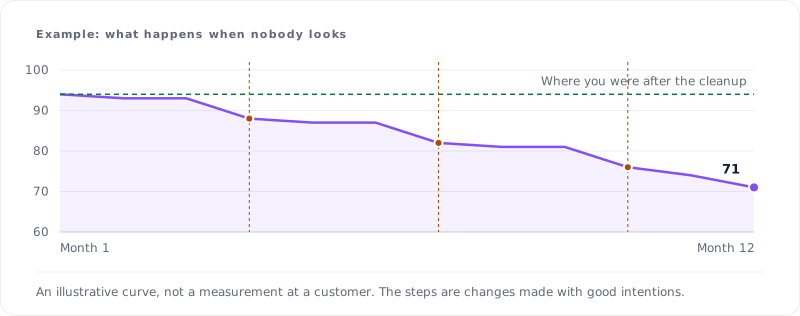
This is called drift. Not one person doing something stupid, but a hundred small, reasonable decisions that together add up to something you did not design. The chart above is an illustration rather than a measurement at a customer, but the shape is right: it slides in steps rather than smoothly, because a tenant changes in lumps.
Five causes, in the order I run into them
The exception that stayed. Someone could not sign in from a hotel on a Friday afternoon. An exception went into a Conditional Access rule to get through the weekend. The weekend is over. The exception is not.
The temporary admin. A colleague got admin rights for one job. The job finished, the rights did not get pulled. Do that twelve times and you have sixteen admins where four belong. Microsoft's own guidance is to replace permanent role assignments with time-bound ones for exactly this reason.
Guests who stay. An external project ends and the guest accounts remain. They do nothing, so nobody notices them. But they exist, and they can still reach whatever they were allowed to reach. Entra ID has access reviews that clean this up periodically, and in most tenants they are switched off.
The app registration with too much access. Someone built an integration with another system. During setup, broad consent was granted, because then it definitely works. That consent is still there, and nobody looks at what is approved under Enterprise Applications.
The account created outside the process. A new hire had to start quickly, so the account was made by hand instead of the usual route. Which means it misses exactly the group your policy hangs on.
Why you do not see it
This is the real problem. No screen in Microsoft 365 shows you what changed in your security posture since last month. You see the current state. You do not see the movement.
And the current state usually looks fine, because every individual setting is defensible. The exception was justified when it was made. The admin rights were needed. The guest account belonged to a real project. Only when you add it all up and compare it with a month ago does the direction become visible.
On top of that, the audit log tells you that something changed, but not whether it got worse. "Policy modified by administrator" is not a judgement.
What to do about it
The answer is not stricter policy. Every change above was reasonable. The answer is that someone or something has to track the difference. Which is, not by accident, measure ten of the Dutch cybersecurity act's duty of care: assess whether your measures actually work.
In practice:
- Set a fixed monthly check of three things, and no more: the number of accounts with admin rights, the exceptions in your access rules, and guest accounts that have done nothing for ninety days. Fifteen minutes.
- Give every exception an end date at the moment you create it. Even if it is only a note in the description.
- Look once at what your apps are allowed to do. The consent list is almost always longer than expected.
If you would rather have this checked continuously than by hand every month, you can have it measured. But start with those fifteen minutes, because most drift sits in the first two items and you can spot those with the naked eye.
Sources
All sources were consulted on 8 September 2026.
Microsoft. (2026). Best practices for Microsoft Entra roles. https://learn.microsoft.com/en-us/entra/identity/role-based-access-control/best-practices
Microsoft. (2026). Manage guest access with access reviews. https://learn.microsoft.com/en-us/entra/id-governance/manage-guest-access-with-access-reviews
Microsoft. (2026). What is Conditional Access? https://learn.microsoft.com/en-us/entra/identity/conditional-access/overview
Microsoft. (2026). Manage app consent requests. https://learn.microsoft.com/en-us/entra/identity/enterprise-apps/manage-consent-requests
Microsoft. (2026). Audit log activities. https://learn.microsoft.com/en-us/purview/audit-log-activities
Nationaal Cyber Security Centrum. (2026). Zorgplicht. https://www.ncsc.nl/cyberbeveiligingswet-nis2/zorgplicht